
A security camera sold as wireless sends its video to the router over Wi-Fi, but its power still comes from one of three places: a rechargeable battery inside the housing, a plug-in adapter at a nearby receptacle, or a hardwired feed from a light fixture's box or a doorbell's wiring. A PoE camera (power over Ethernet) meets both needs, video and power, with one cable. A single network cable runs from the camera to a PoE switch or a recorder with PoE ports built in, carrying video in and power out. Which setup holds up depends on which link a house can keep steady: the radio path through its walls, the power source at each camera, or a cable route from each mounting spot back to one closet.
Each of the three setups handles power, video, and failure in its own way:
| PoE camera | Wi-Fi camera with a power feed | Battery camera | |
|---|---|---|---|
| How the camera is powered | From the switch or recorder, over the network cable | A plug-in adapter, or wiring at a light fixture or doorbell | A rechargeable battery in the housing |
| How video reaches the recorder or network | Over the same network cable | Over Wi-Fi to the router | Over Wi-Fi, or to a base station on some models |
| When Wi-Fi drops | The camera's link is unaffected | The camera loses its link until the signal returns | Clips cannot reach the app until the signal returns |
| When the power blinks | Cameras on an unbacked switch go dark and restart | The camera and the router both restart | The camera keeps running on its charge |
| Maintenance | No batteries; weather-sealed connections at the mount | No batteries; signal strength at the mount decides results | Recharging or swapping the battery |
| Where it fits | Spots a cable can reach from the attic, a soffit, or an inside wall | Spots near a receptacle or fixture with a steady signal | Spots with no power and no cable route |
How Power Travels Over the Network Cable
A network cable holds four twisted pairs of copper conductors. Data moves along those pairs as a rapidly changing signal, and PoE supplies a steady DC supply over the same conductors, using two of the pairs or all four, depending on the equipment. The camera separates the two at its end: the data goes to its network circuitry, and the power goes to a small converter that feeds the image sensor, the processor, the night-vision illuminator and, on some outdoor models, a heater or the motors that pan and tilt the lens.
In a home system, the power comes from either a PoE switch or a recorder with PoE ports on its back panel. A recorder with built-in ports records and powers in one box. A separate PoE switch handles power and passes the video on, which suits a house where the cameras outnumber the recorder's ports.
One cable carrying both jobs changes how a fault shows up. A crushed cable, a loose plug, or a corroded connection at the mount can cut the camera's power and its picture, leaving the camera dark on the recorder. A fault on one wired camera sits on its own run: the cable, its two connections, its port, or the camera. A dark Wi-Fi camera may have lost power at its adapter, lost signal at the router, or both.
Signal and Reliability on a Busy Home Network
A security camera sends video upstream in a steady stream. On Wi-Fi, every device on a single channel shares that channel's airtime, so a camera's stream competes with laptops, phones, televisions, and other cameras on the same band. On a quiet network, a camera with a strong signal holds a clean picture. With the household streaming and on video calls at once, the same camera can drop to a lower bit rate, showing a blurred or blocky image, or stall and reconnect.
Walls decide the rest. An outdoor camera sits on the far side of the exterior wall from the router, and its signal passes through siding, sheathing, insulation and drywall on the way in. Brick, stone and stucco over metal lath absorb or block more of the signal than wood siding does, and foil-faced insulation reflects it. The two Wi-Fi bands trade range for capacity: 2.4 GHz reaches farther through walls but carries less data and shares its channel with more household devices, while 5 GHz carries more data but fades sooner through solid materials. Some cameras connect only on 2.4 GHz, which ties them to the more crowded band.
A PoE camera's cable is a private path to the switch, with no airtime to share and no wall to cross by radio, so a camera at the far corner of a brick house gets the same link as one over the front door. The trade is a cable route for every camera. A Wi-Fi camera a short, clear distance from the router, through one wood-framed wall, can deliver a steady picture, and a house with that layout gives up less by going wireless.
When the Power Blinks
A PoE system concentrates its power in one closet. A flicker that resets the switch or recorder turns every camera dark at once, and each needs time to boot before recording resumes. The same concentration helps: a battery backup on the recorder and switch keeps every camera running through a blink from a single point.
Wi-Fi cameras with power feeds spread the risk across the house. Each adapter plugs into its own receptacle, and those receptacles can sit on different circuits, so a tripped breaker on one circuit takes out only the cameras it feeds. All of them still depend on the router and modem, and a blink that resets those drops every camera's link. Battery cameras run through an outage on their own charge, but a clip recorded while the router is down has nowhere to go.
Where the recorder's closet has no receptacle, adding one is circuit work for an electrician, as is a new outdoor or eave receptacle for a plug-in camera's adapter.
Where Cameras Mount and How the Cable Reaches Them
On a house with an attic, a camera mounted under the eave is sheltered from rain and direct sun, and its cable runs from the attic through a small hole in the soffit to the camera's base. The cable then crosses the attic to a point above the recorder's closet and comes down inside a wall through the top plate. Upper-floor soffits connect to the attic directly; a camera at a first-floor eave under a second story, or over a garage with a room above it, needs a route through the floor framing or up from a basement through the rim joist.
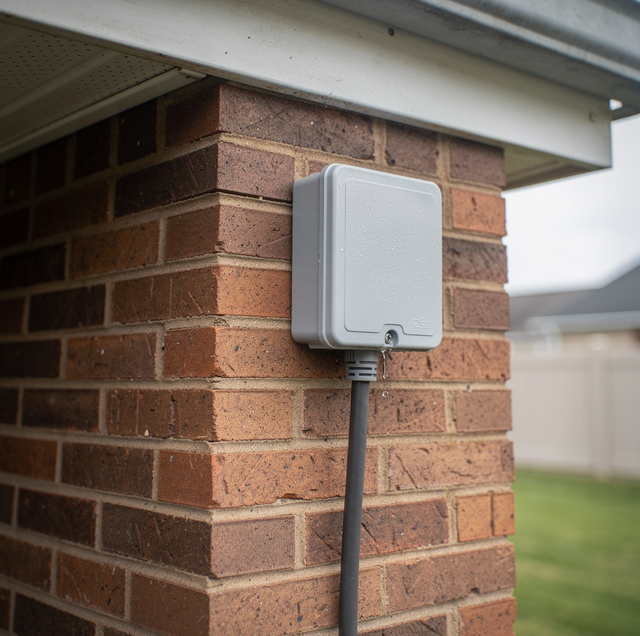
On an exterior wall, the cable runs from inside and terminates in a junction box on the siding, with the camera mounted on the box. On some cameras, the network plug hangs from a short lead behind the housing, with a weather cap over it, and the junction box provides that connection with a dry enclosure. Every hole through the siding or soffit is sealed around the cable to prevent water and insects.
Low-voltage camera cable stays separate from the house's power cable in walls and attics, crossing it at right angles wherever their paths intersect. Any run through a wall, soffit, or attic that also carries power circuits is drilled and fished by the electrician, who first confirms what is in the cavity.
An overhead service drop meets the house near the roofline, and a ladder, fish rod or cable touching it can deliver a fatal shock. The electrician plans camera spots and cable routes at the eaves to stay clear of it.
Interference, Jamming and a Cut Cable
A Wi-Fi camera's link travels through open air, and anything crowding that air can interrupt it: a neighbor's network on the same channel, or a microwave oven running on the 2.4 GHz band. A jamming device, or a flood of disconnect signals aimed at the network, can knock a Wi-Fi camera offline for as long as it runs.
A wired camera has no radio link to disrupt, so its exposure is physical: a cable run on the outside of a wall can be reached and cut. That is the reason a PoE run stays hidden inside the soffit, attic, or wall all the way to the camera's base. A cut-wired camera also drops off its port at a moment the recorder can log.
Mixing Systems on One House
A house can run both kinds at once, and the split follows the cable routes. PoE cameras cover the spots a cable can reach from the attic or an inside wall: the front entry, the driveway, the back door, and the garage. A battery camera covers a detached shed, a gate at the far end of a fence line, or a spot where no cable route exists without opening a finished ceiling.
The recorder decides how well the two halves work together. Some accept Wi-Fi cameras from the same maker and show every camera on one screen; others handle wired cameras alone, leaving the wireless ones in a separate app. PoE also powers equipment other than cameras. An outdoor Wi-Fi access point runs on the same kind of cable, so a PoE switch can deliver a strong signal to a patio or yard where wireless cameras are mounted.
A spare cable pulled to a likely future camera spot, while the attic route is open for the first runs, leaves that spot ready. Adding the camera later becomes a matter of mounting it and plugging in at the switch.
Frequently Asked Questions
An active PoE switch cannot. Before an active port sends any power, it tests the line for the electrical signature of a powered device, and a laptop, television, or printer without that signature gets a data connection but no power. Passive PoE gear, whether a switch or a single-cable injector, skips that test and applies power as soon as a cable is connected.
The switch's power budget sets the limit. That budget is a total shared across all of its ports, separate from the port count. Cameras draw more at night, when their infrared illuminators switch on, and models with heaters or motors draw more again. When the combined draw reaches the budget, the switch can withhold power from a port, and the camera on it stays dark even though its cable is sound, so the budget is chosen to cover every camera's night-time draw.
Yes, when they record to a recorder inside the house. The cameras, the switch and the recorder form a local network that does not pass through the internet connection, so recording carries on while the modem is offline, and only remote viewing from a phone away from home stops until service returns. A camera that stores its video on an off-site server has nowhere to send it during the outage unless it carries a memory card of its own.
It can sit alongside it. A wired video doorbell draws power from the existing doorbell wiring and the chime transformer, and sends its video over Wi-Fi; PoE doorbells also exist for doors with a network cable run. The transformer serving an older chime can supply less power than a video doorbell draws, and the remedy is a replacement transformer sized for the doorbell, which is electrical work.
It can, through a pair of adapters. Coaxial cable has a center conductor and a shield, whereas PoE uses the twisted pairs of a network cable, so coax cannot carry PoE as is. An adapter at each end of the coax run carries a network connection, and some models also carry power, allowing a new network camera to use a run that would be hard to replace.
The infrared illuminators around the lens light up whatever sits closest to it. A camera tucked tight under a soffit, or aimed along a wall, bounces that light off the soffit or siding back into its own lens, washing out the night image; a spider web across the lens catches the same light and fills the frame. Mounting the camera so its lens clears the soffit edge and looks away from nearby surfaces keeps the reflection out.
Bring in PoE camera wiring for your entries, driveway and yard — Cat6 runs from each camera location back to the recorder or PoE switch, plus power for the recorder. Rojas Electric serves Fairfax and all of Northern Virginia. Call (703) 810-3693.